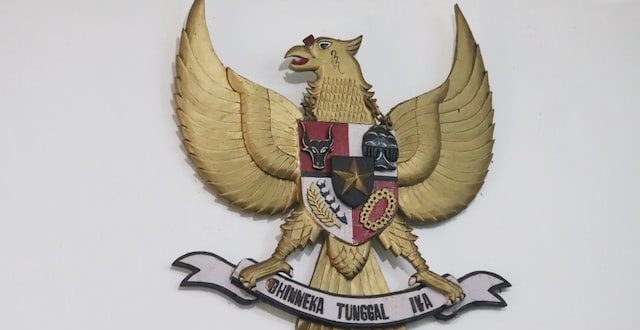
IndoMetric – Pancasila merupakan ideologi bangsa negara Indonesia yang mana menjadi dasar, pandangan serta tujuan dalam mewujutkan segala cita-cita bangsa Indonesia. Kini pancasila dijadikan sebagai lambang dan dasar negara kesatuan kita. Di mana setiap baitnya memiliki arti yang cukup besar bagi kesatuan dan cita-cita bangsa Indonesia.
Dari awal perlawanan kepada pihak Jepang tersebut, bangsa Indonesia terus berupaya untuk mempersatukan bangsa lewat beberapa aksinya untuk segera memerdekakan negaranya. Namun dibalik sejarah kemerdekaan yang panjang, terselip sejarah perumusan pancasila yang belum banyak diketahui.
Di satu sisi proses pembuatan lambang dasar negara ini memiliki sejarah yang berliku. Pada awal tahun 1945, Indonesia masih dalam posisi dijajah oleh Bangsa Jepang. Saat itu Jepang mampu mengalahkan Belanda yang sebelumnya telah lama menjajah negara kita. Namun pada saat itu Jepang sedikit terusik oleh beberapa perlawanan rakyat yang begitu menentang bangsa Jepang, selain itu perlawanan dari pihak Belanda yang dibantu oleh sekutu pun juga semakin melemahkan pihak Jepang.
Sejarah Perumusan Pancasila
Dengan keadaan bangsa Jepang yang semakin melemah, maka pihak Jepang berjanji kepada Indonesia untuk segera memerdekan bangsanya. Hal ini dimaksudkan oleh Jepang agar seolah-olah kemerdekaan Indonesia masih dibawah naungan bangsa Jepang. Hingga pada saat itu Pemerintah Militer Jepang yang ada di Indonesia membentuk sebuah badan yang diberi nama Dokuritsu Junbi Cosakai atau Badan Penyelidik Usaha-Usaha Persiapan Kemerdekaan Indonesia.
Badan Penyelidik Usaha-Usaha Persiapan Kemerdekaan Indonesia (BPUPKI) tercatat telah mengadakan sidang sebanyak dua kali, yaitu sidang pertama yang diadakan tanggal 29 Mei – 1 Juni 1945 dan sidang kedua yang diadakan tanggal 10 Juli – 16 Juli 1945.
Sidang I BPUPKI Pada Tanggal 29 Mei – 1 Juni 1945
Di dalam sidang ini BPUPKI membahas tentang rumusan dasar negara yang akan dipakai setelah Indonesia merdeka nanti. Pada persidangan pun dikemukakan banyak pendapat mengenai perumusan dasar negara yang dikemukakan oleh M. Yamin, Supomo dan Ir. Soekarno.
- Atas Usulan M. Yamin
- Supomo
- Ir. Soekarno
- Yamin pada saat itu mengemukakan atas pemikirannya mengenai dasar negara yang akan dipakai setelah Indonesia merdeka dihadapan panitia sidang pada tanggal 29 Mei 1945. Atas pemikirannya ini, M. Yamin mengusulkan tentang “Asas dan Dasar Negara Kebangsaan Republik Indonesia” yang meliputi:
- Peri Kebangsaan
- Peri Kemanusiaan
- Peri Ketuhanan
- Peri Kerakyatan
- Kesejahteraan Rakyat Indonesia
Sedangkan pada tanggal 31 Mei 1945, Supomo juga mengemukakan pemikirannya tentang dasar negara yang akan dipakai setelah Indonesia merdeka nanti. Dalam pidatonya ini, Supomo ingin membntuk sebuah negara yang berdasarkan integralistik yang meliputi hal-hal berikut:
- Persatuan
- Kekeluargaan
- Keseimbangan Lahir dan Batin
- Musyawarah
- Keadilan Sosial
Pada tanggal 1 Juni 1945, Ir. Soekarno mendapatkan gilirannya untuk mengemukakan pemikirannya mengenai dasar negara Indonesia yang akan dipakai setelah Indonesia merdeka. Dalam pidatonya ini Soekarno memiliki pemikiran yang terdiri dari lima asas. Dalam sidang itu pula sesuai saran dari rekan dan panitia mengusulkan untuk memberinya nama sebagai “Pancasila” yang meliputi:
- Kebangsaan Indonesia
- Peri Kemanusian
- Mufakat atau Demokrasi
- Kesejahteraan Sosial
- Ketuhanan Yang Maha Esa
Sidang II BPUPKI Pada Tanggal 10 – 16 Juli 1945
Meskipun sidang I BPUPKI sudah berakhir, namun perumusan dasar negara yang akan digunakan setelah Indonesia merdeka belum juga terbentuk. Dalam hal ini BPUKPKI membentuk Panitia Perumus Dasar Negara yang beranggotakan 9 orang. Yang mana panita ini dibentuk untuk menampung segala bentuk aspirasi yang ada dalam upaya pemebntukan dasar negara Republik Indonesia. Panitia ini beranggotakan 9 orang, yang terdiri atas:
- Ir. Soekarno
- M. Hatta
- H. Agus Salim
- Mr. A. A. Maramis
- Abdulkazar Muzakir
- Cokrosuyoso
- KH. A. Wachid Hasyim
- M. Yamin
- Ahmad Subarjo
Selain membentuk panitia 9, Badan ini juga melakukan perancangan UUD yang mana diketuai oleh Ir. Soekarno. Panitia ini kemudian membentuk sebuah Panitia Kecil Perancang Undang-Undang Dasar (PKPUD) yang diketuai oleh Dr. Soepomo. Membentuk Panitia Ekonomi dan Keuangan yang diketuai oleh M. Hatta, serta membentuk Panitia Pembelaan Tanah Air yang diketuai oleh Cokrosuyoso. Di dalam melaksanakan tugasnya, panitia telah berhasil menyelesaikan:
Panitia Kecil Perancang Undang-Undang Dasar (PKPUD) telah berhasil menyusun naskan rancangan pembukaan UUD pada tanggal 22 Juni 1945. Dalam rancangan pembukaan UUD ini kemudian dikenal dengan nama “Piagam Jakarta” yang terdiri dari empat alinea yang mana alinea keempat berisi rumusan Pancasila sebagai dasar kesatuan negara Indonesia.
Tanggal 14 Juli 1945, Ir. Soekarno selaku ketua BPUPKI melaporkan hasil kerja Panitia Perancang Undang-Undang Dasar pada sidang yang digelar saat itu. Dalam sambutannya tersebut Soekarno melaporkan 3 pokok hal dasar, yaitu perencanaan tentang Indonesia merdeka, pembukaan Undang-Undang Dasar dan juga isi Undang-Undang Dasar (batang tubuh).
Pada tanggal 15 – 16 Juli 1945 diadakan sidang yang bertujuan untuk menyusun Undang-Undang Dasar berdasarkan hasil kerja Panitia Perancang Undang-Undang Dasar. Setelah itu pada tanggal 17 Juli 1945 panitia berhasil melaporkan hasil kerja atas penyusunan UUD dan laporan telah diterima oleh ketuan BPUPKI yaitu Ir. Soekarno.
Setelah menyelesaikan tugasnya, kemudian panitia ini dibubarkan dan dibentuklah badan baru atas siasat bangsa Jepang yang bernama Dokuritsu Junbi Inkai atau Panitia Persiapan Kemerdekaan Indonesia yang disingkat menjadi PPKI. Badan ini langsung diketuai oleh Ir. Soekarno dan diwakili oleh M. Hatta.
Penetapan Pancasila Sebagai Dasar Negara Indonesia
Dalam waktu yang tidak terlalu lama setelah sidang II BPUPKI di selenggarakan, maka PPKI juga menyelenggaran sidang yang dihadiri oleh 27 orang. Sidang tersebut menghasilkan sebuah keputusan-keputusan penting yang mana di dalamnya terdapat penetapan Pancasila yang digunakan sebagai dasar negara Republik Indonesia.
- Menetapkan dan mengesahkan pembukaan UUD 1945
- Dilantiknya ketua PPKI yaitu Ir. Soekarno dan wakilnya M. Hatta
- Pekerjaan presiden untuk sementara waktu akan dibantu oleh Komite Nasional Indonesia Pusat atau KNIP.
Setelah tenggang waktu sidang tersebut, maka pada tanggal 18 Agustus 1945 tepatnya satu hari setelah kemerdekaan Indonesia diumumkan. PPKI mengesahkan UUD1945 yang mana di dalamnya dimuat dasar negara Pancasila. Itulah sejarah perumusan pancasila dan hingga saat ini kita mengenal bahwa pancasila sebagai dasar negara Republik Indonesia yang diperingati setiap tanggal 1 Juli.